Jaksta Media Recorder for Windows Start a new topic
Recordings Corrupted After Completion
I was excited to see we got the next extraction engine. But after the update/intall/restart Jaksta still fails to capture Chaturbate. Seems the identical issue that it's only capturing audio. My saved Jaksta files show it as an ''.mp4'' file with 0mb. Such a disappointment. I thought they'd be able to fix the errors but the errors remain. I sent the info to support a few minutes ago with as much info as I could. Hopefully it may help get us updated for Chaturbate. I hope we don't have to wait another month or longer. This feels like the toughest CB issue in a long while. We need more people reporting this error friends. Contact Jaksta support and create a ticket and state it is urgent.


@Alejandro
Thanks for the reply.
The problem of monitors/downloads not starting (Chaturbate) sadly is something that is going on for months and i do have it on all devices which i tried...
I once heard if there are too many checks Jaksta gets throttled but i already doubled and tripled times (most check every 999 seconds) and still often no stream. I Wonder if i should try the reverse and check every 50 seconds on all monitors? At least gives Jaksta 20x the amount of tries lol.
I didn't have time to reply earlier. Towards the name tag problem:
Could you be kind and upload a screen on how your name rules look + post the rule so i can try exactly yours? Also are you on 2026 current version?
Thanks in advance :)
@ RA
I don't mean to get in between your questions. I've not had any issues with Chaturbate for years. (The occasional stream changes happen and our solved each time.) I can probably capture more than five streams at once but have never set it for more than five at a time. You do have some curious problem going on. Chaturbate, MFC, youtube etc change/rescramble their streams settings to discourage captures. At the moment Chaturbate has failed to record for around a week or two. Normally Jaksta solves it a bit quicker. Sadly they have not solved the problem.

So the new update, 2026.4.3.34, just dropped and the only relevant thing on the patch note is the "improved tagging" which is still a hit or miss from my experience so far. I did notice that a lot of my recordings finish successfully and end up as an mp4 file with audio along with all my proper tags, but it isn't 100% yet. There's nothing in the patch notes about actually recording/capturing and the next update would probably be a month from now or even longer, quite sad tbh.
Ever since @Edwin Wells shared the idea to change the HLS downloader from HLSD > FFMPEG which recorded .ts files, which I didn't mind since I have experience with it, I at least was able to properly record streams somewhat without having to rely on my back up recorders which all have to be manually done.
Jaksta's tagging and converting features for some reason keeps trying to use 100% of my CPU which would then cause my PC to crash. This happened when I tried to turn the "Download as MPG" on and it crashes my PC when it starts to finalize and tag. When I turned it off and added an auto convert to mp4, same problem so I just kept it off and recorded and finished with a .ts file instead. I then just uesd my old .bat file from years ago that auto converts all .ts files in a folder into .mp4 and places them in a separate converted folder, all using the same FFMPEG that Jaksta uses but without eating up my CPU.
All in all, I think I've adapted to the current predicaments just waiting for it all to get sorted out. Hopefully Soon.


I also have been dealing with this problem, i recommend everyone checks out
Edwin Wells suggestion near the buttom of page 1, as that seems to be working here as well.
Atleast this way Jaksta isnt completly useless until they get it fixed!
You can convert also convert from .ts container to .mp4 container without re-encoding the entire file by copying the video and audio streams into mp4. I was able to convert a 5.5GB .ts file in 1min 13 sec, this uses very little CPU and is just basically copying data
Doing it via ffmpeg
ffmpeg -i <InputFile>.ts -c:v copy -c:a copy <OutputFile>.mp4
or creating a custom conversion config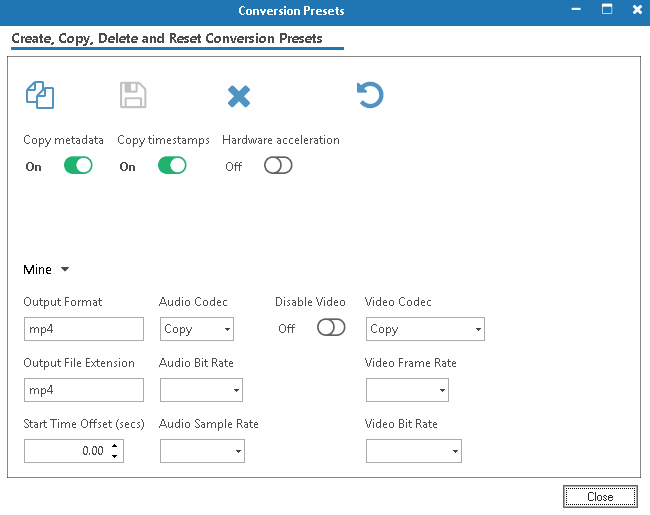
I'm baffled that you guys are capturing anything at CB? All I get are audio only recordings. I'm obviously not too familiar with how it all works but in my years of using Jaksta I've never seen this error. It doesn't help that Chaturbate has become unstable for many days. A website making millions but obviously toying with the quality of their streams now. Almost all rooms have small glitches all the time. But I'm unable to capture a thing now. Just weird audio attempts with 0mb results
Jaksta works fine on other sites like youtube. So it can work


One other detail which you all have probably noticed is the newest update clearly states the extraction tool was updated on March 17, longgggg before these errors began. Like Alejandro mentioned it may be at least a month before they fix this. I sent another report to Jaksta Support about all of this but now they are not replying as they did before.
Today CB seems a bit more stable. Many of you had to have noticed that CB rooms show or showed insane numbers of visitors in any one room. Wild numbers in the 10,000 or 20,000's. CB is screwing with something and it's making streams worse than they had been. Popular rooms get into the high 9k or more.... but 20k? Come on.
@Edwin Wells You replying to me? lol
@Philip Lindsten
Correct me if i'm wrong but that screenshot is kinda telling me your HLS downloader is still set to HLSD. mb if i'm wrong
Changing the HLS downloader alone should allow you to successfully record a stream. It might look like it doesn't work a lot of the times since it completes with an (error) but if you look at the file size, that should tell you that it succeeded, assuming it doesn't say 0mb. you can then just use something like VLC to watch it or whatever player of your choosing that supports .ts files without having to convert it or change any other settings.
Settings > Internet Downloads > Advanced Settings (Advanced button) > HLS > HLS Downloader > Drop down > Change from HLSD to FFMPEG
---
Viewbotting has been on the rise lately not just on CB, but on all other live streaming sites. There are companies that do it and streamers/viewers use it to boost and push their rooms to the front page. Everything is getting very competitive so it's an option for them ig. CB seems to be cracking down on it tho as there aren't that many now or at least rooms arent paying for insane amount of viewers
My gods that worked. It still reads as audio only but when it completes it is a normal vid on playback. Thanks so much wow! You rule, Alejandro
Oh they call it viewbotting? I'm just being grumpy how so many rooms seem to have small glitches. Another way I see a marked change is going full screen. Live full screen DEF loses some frames. I don't recall that happening before in the past. The damn bot sales that CB obviously welcomes with open arms are bad enough but this junk that can surely degrade a stream just plain sucks.
Thanks again for the help
It seems I may not be able to capture a private or ticket show now? The auto button worked perfectly in the past with no issues. If I click the auto button I'm hit by many false failures in a row. At least I can capture regular streams. I hope they deliver an update next month. That prior only dated up to March 17th
@Philip Lindsten
Yes it does seem like auto still doesnt work correctly. I have been able to record the clips with auto, however with auto in this form, the audio was missing instead of the other way around.
If i had to guess maybe its because the auto recording we see running is only for the video part, while audio might be the many short bits, it keeps spamming?
Only a thought on my end based on Jaksta showing the other recordings as audio only even if they capture everything, no actual proof or knowledge behind it though so i might be totally wrong.
This happening to me also
RE:
Everything works normally while I’m monitoring or recording, but recently every recording has started failing as soon as it finishes. After the final step, tagging, the file breaks. Some recordings show as 0 bytes as if nothing was captured, some show an error, some say ‘manually stopped’ even when I didn’t stop them, and others show as completed but contain no data.
This has been happening for about a week, getting progressively worse, and today every single recording is broken and shows nothing.
how do you change this Edwin? changing the HLS downloader from HLSD to FFMPEG actually keeps the file. Turn off save as mpeg (since it creates huge files) and it will be saved as mp4 in a .ts container.. Not great but it seems to work for me
Alejandro
Everything works normally while I’m monitoring or recording, but recently every recording has started failing as soon as it finishes. After the final step, tagging, the file breaks. Some recordings show as 0 bytes as if nothing was captured, some show an error, some say ‘manually stopped’ even when I didn’t stop them, and others show as completed but contain no data.
This has been happening for about a week, getting progressively worse, and today every single recording is broken and shows nothing.
8 people have this problem